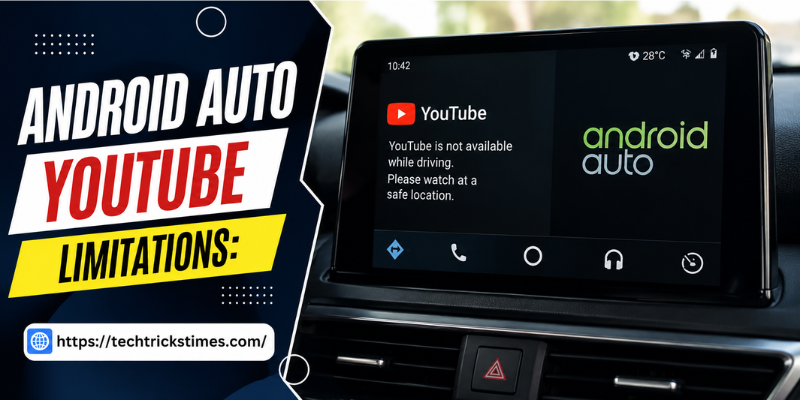

If you’ve ever tried watching YouTube through Android Auto, you’ve probably encountered several restrictions. android auto youtube limitations exist for an important reason: driver safety. While many users wish they could stream videos directly on their car display, Android Auto intentionally limits video playback to reduce distractions and promote safer driving.
Understanding these limitations can help you avoid frustration and discover legal alternatives that improve your in-car entertainment experience. In this guide, we’ll explain why these restrictions exist, what you can and cannot do, and the safest ways to enjoy YouTube content while using Android Auto.
Why Android Auto Blocks YouTube Video Playback
Google designed Android Auto with one primary goal—keeping drivers focused on the road. Watching videos while driving dramatically increases distraction and raises the risk of accidents.
For this reason, Android Auto only supports apps that meet strict safety guidelines. These include:
- Navigation apps
- Music streaming services
- Podcasts
- Audiobooks
- Voice assistants
- Messaging applications
Video streaming apps such as YouTube are intentionally excluded because they require visual attention.
Understanding Android Auto YouTube Restrictions
Several android auto youtube limitations affect how the app works inside compatible vehicles.
No Native YouTube Support
Android Auto does not officially include a YouTube application. Even if YouTube is installed on your phone, it won’t appear on your vehicle’s infotainment display.
Video Playback Is Disabled
The platform blocks video playback while Android Auto is active. This applies whether your car is moving or stopped in many cases.
Screen Mirroring Is Limited
Android Auto prevents standard screen mirroring to avoid bypassing safety controls. Most official devices cannot display your phone screen directly.
Third-Party Apps Carry Risks
Some unofficial applications claim to enable YouTube on Android Auto. However, these solutions often require advanced modifications, may violate Google’s policies, and could introduce security or stability issues.
Can You Watch YouTube on Android Auto?
Officially, the answer is no.
Google has never provided native support for YouTube video playback through Android Auto. Even newer Android Auto versions continue enforcing these safety restrictions.
However, there are a few situations where users access YouTube content:
- Listening to YouTube audio only
- Playing videos directly on a parked phone
- Using manufacturer-specific infotainment systems that support separate media apps
- Installing unofficial third-party applications (not recommended)
Safe Alternatives to Watching YouTube in Your Car
Instead of focusing on video, consider safer entertainment options that work perfectly with Android Auto.
Listen to YouTube Music
If your favorite content includes music, playlists, or albums, YouTube Music integrates seamlessly with Android Auto.
Enjoy Podcasts
Many YouTube creators publish podcast versions of their content, making them ideal for long drives.
Audiobooks
Audiobook platforms provide educational and entertaining content without requiring visual attention.
Voice-Controlled Entertainment
Google Assistant lets you control playback, search music, answer messages, and navigate entirely through voice commands.
Why Google Enforces Android Auto YouTube Limitations
Google’s restrictions aren’t simply technical—they’re based on road safety.
Several reasons explain these limitations:
- Reduce driver distraction
- Comply with transportation safety regulations
- Lower accident risks
- Simplify the driving interface
- Promote hands-free interaction
These principles help Android Auto remain one of the safest connected driving platforms available.
Are Unofficial Workarounds Worth Trying?
Many online tutorials advertise methods for enabling YouTube on Android Auto.
These often involve:
- Modified APK files
- Rooted Android devices
- Third-party launchers
- Developer mode changes
Although they may work temporarily, they come with several disadvantages.
Security Concerns
Modified applications may contain malware or expose personal data.
Software Instability
Unofficial tools frequently stop working after Android Auto updates.
Warranty Issues
Rooting your device or modifying software could void warranties or affect system reliability.
Safety Risks
Watching videos while driving creates dangerous distractions that can lead to serious accidents.
For most users, avoiding these unofficial solutions is the better choice.
Future Possibilities for Android Auto and YouTube
Technology continues evolving, and Android Auto regularly receives new features.
Future updates could introduce smarter entertainment options, such as:
- Enhanced parked-mode media support
- More voice-first YouTube integration
- Improved audio-only experiences
- Better compatibility with smart displays
Even if these features arrive, Google will likely continue preventing video playback while a vehicle is moving.
Tips for Getting the Best Android Auto Experience
You don’t need YouTube videos to enjoy Android Auto.
Instead:
- Create YouTube Music playlists before driving.
- Download podcasts for offline listening.
- Use Google Assistant for hands-free control.
- Keep Android Auto updated.
- Plan navigation before starting your trip.
- Minimize distractions to stay focused on driving.
These simple habits make every journey safer and more enjoyable.
Frequently Asked Questions
Why doesn’t YouTube work on Android Auto?
Google blocks YouTube video playback because it can distract drivers and increase accident risks. Android Auto prioritizes navigation, communication, and audio entertainment.
Can I legally watch YouTube while parked?
In many situations, you can watch YouTube directly on your phone while safely parked. However, Android Auto itself still does not officially support native YouTube playback.
Is YouTube Music available on Android Auto?
Yes. YouTube Music is fully supported and offers playlists, albums, podcasts, and personalized recommendations through Android Auto.
Do third-party apps enable YouTube on Android Auto?
Some unofficial apps claim to remove android auto youtube limitations, but they may create security risks, compatibility problems, and software instability.
Will Google ever allow YouTube on Android Auto?
Google has not announced plans for full YouTube video support. Future improvements may focus on audio features while maintaining strong safety protections.
Conclusion
The android auto youtube limitations are designed with safety as the highest priority. Although many users would prefer full YouTube support on their vehicle display, Google’s restrictions help reduce distractions and encourage responsible driving. Fortunately, alternatives such as YouTube Music, podcasts, audiobooks, and voice controls provide excellent entertainment without compromising road safety. Understanding these limitations allows you to make smarter and safer choices every time you drive.
Stay in touch to get more updates & alerts on techtrickstimes.com! Thank you