
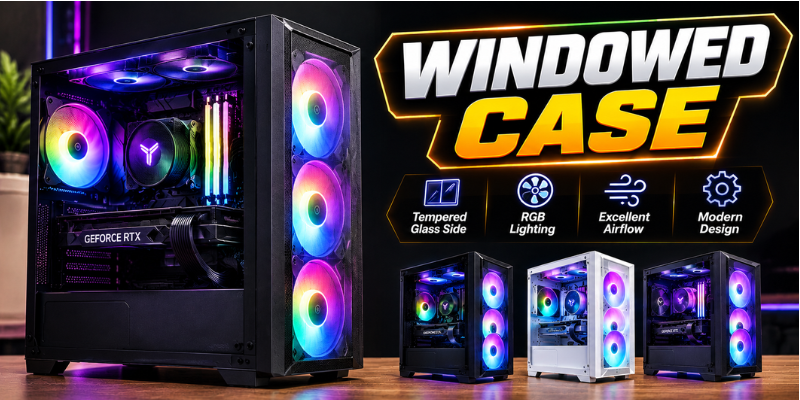

A windowed case can completely change the appearance of a desktop PC. Instead of hiding the hardware behind a solid panel, it gives you a clear view of components such as the motherboard, graphics card, RAM, and cooling system. For gamers and PC enthusiasts, that visual appeal can be just as important as performance.
However, looks are only part of the story. A well-designed case can also improve airflow, cable management, component compatibility, and future upgrades. Choosing the right model means finding a balance between appearance, cooling, space, noise, and build quality.
What Is a Windowed Case?
A windowed case is a computer chassis that includes a transparent side panel, usually made from tempered glass or acrylic. The panel allows users to see the internal components without opening the case.
Modern designs often combine glass panels with RGB lighting, clean cable routing, and carefully arranged cooling fans. This makes the interior of a PC part of its overall design rather than something hidden away.
Tempered glass is especially popular because it offers a premium appearance and tends to resist scratches better than many plastic alternatives. Acrylic panels can be lighter and less expensive, although they may scratch more easily.
For someone building a gaming PC, a windowed design can make the finished system feel more personalized. You can display coordinated components, lighting, custom cables, and other details that reflect your style.
Why Choose a Windowed PC Case?
The biggest advantage is visual presentation. If you have invested in attractive hardware, it makes sense to be able to see it.
A windowed PC case can showcase a graphics card, liquid cooler, RGB memory, motherboard lighting, or a carefully organized interior. This is particularly appealing for gaming setups where the computer is placed on a desk.
Another benefit is easier visual inspection. A transparent panel lets you quickly check whether fans are spinning, whether cables are obstructing airflow, or whether dust has accumulated inside. You still need to open the case for maintenance, but basic checks can be easier.
There is also a psychological benefit. Building a PC takes time and effort, and seeing the finished components can make the project more satisfying.
Windowed Case Cooling and Airflow
A glass side panel does not automatically make a PC run hotter. Cooling performance depends much more on the overall case design, fan placement, ventilation, and component configuration.
A good case should provide clear paths for cool air to enter and warm air to leave. Front, bottom, and rear ventilation can work together to create effective airflow through the chassis.
When shopping for a windowed case, pay attention to its fan support. Some models provide mounting locations for several intake and exhaust fans, while others focus more heavily on appearance.
Dust filters are another useful feature. Removable filters at major intake points can reduce the amount of dust entering the system while making cleaning easier.
For high-performance hardware, radiator support can also matter. If you plan to use an all-in-one liquid cooler, check whether the chassis supports the radiator size and mounting position you need.
Choosing the Right Size and Compatibility
A beautiful case is not useful if your hardware does not fit inside it. Before buying, check compatibility with your motherboard, graphics card, CPU cooler, power supply, and storage drives.
Full-tower cases offer considerable room and are useful for large builds with multiple components. Mid-tower designs are generally more practical for mainstream gaming PCs because they provide a good balance between internal space and desk footprint.
Compact cases can be attractive for smaller systems, but they require more careful planning. Large graphics cards and CPU coolers may have limited clearance, while cable management can become more challenging.
Graphics card length is particularly important. Modern GPUs can be surprisingly large, so always compare the card’s dimensions with the case manufacturer’s maximum supported GPU length.
The same applies to CPU coolers. Tall air coolers may require significant clearance from the side panel. If the cooler is too tall, the glass panel may not close properly.
Tempered Glass, Acrylic, and Build Quality
The side-panel material can affect both appearance and everyday usability.
Tempered glass generally provides a cleaner, more premium look. It is heavier than acrylic, but many PC builders prefer it because it gives the interior a more polished appearance.
Acrylic is lightweight and can be more affordable. However, it can be more susceptible to scratches, especially if it is cleaned with unsuitable materials.
Build quality matters beyond the side panel. Look for a sturdy chassis, secure panel mounting, useful cable-management space, and easily removable dust filters.
Good cable management is particularly valuable in a windowed design. Messy cables are much more visible through glass, while a clean interior can make even a relatively affordable PC look professionally assembled.
RGB Lighting and Interior Design
RGB lighting has become closely associated with modern windowed PC builds. When used thoughtfully, lighting can highlight the most attractive parts of a system without becoming distracting.
Fans, RAM, graphics cards, motherboards, and liquid coolers may all include lighting. However, more RGB does not necessarily mean a better-looking PC.
A coordinated color scheme often produces a cleaner result. For example, matching lighting with the desktop environment can make the entire setup feel more cohesive.
Cable sleeves, vertical GPU mounts, and decorative accessories can also improve the appearance. These features are optional, but they can turn a basic build into something that looks deliberately designed.
One practical point is that lighting should not interfere with airflow or accessibility. Appearance is valuable, but cooling and maintenance should remain priorities.
Common Mistakes to Avoid
One common mistake is buying a case based solely on its appearance. A beautiful glass panel cannot compensate for poor ventilation or insufficient hardware clearance.
Another mistake is ignoring cable-management space. A case may look spacious from the component side while offering very little room behind the motherboard tray.
It is also easy to underestimate dust maintenance. A glass panel makes dust particularly noticeable, so regular cleaning becomes part of keeping the build looking its best.
Finally, do not assume every modern case supports every type of cooling system. Check radiator compatibility, fan locations, GPU clearance, and power-supply dimensions before purchasing.
A little research before ordering can prevent expensive compatibility problems later.
Is a Windowed Case Worth It?
For many PC builders, the answer is yes. A windowed case combines practical computer hardware with a more personalized visual design.
It is particularly worthwhile if your PC sits somewhere visible, you enjoy customizing your setup, or you have invested in components with attractive finishes and lighting.
That said, the window itself should not be the deciding factor. Airflow, construction quality, component compatibility, noise control, and cable management are more important for long-term satisfaction.
The best choice is a case that looks good while also giving your hardware enough room to operate comfortably.
Frequently Asked Questions
Is a windowed case good for gaming PCs?
Yes. A windowed case can be an excellent choice for gaming PCs, provided it has adequate airflow and supports the required hardware. The glass panel itself does not determine gaming performance; cooling and component selection matter much more.
Does a windowed case improve airflow?
Not necessarily. A transparent side panel is mainly an aesthetic feature. Airflow depends on ventilation openings, fan configuration, radiator placement, and the internal layout of the chassis.
Is tempered glass better than acrylic for a PC case?
Tempered glass usually offers a more premium appearance and better scratch resistance, while acrylic is lighter and often less expensive. The better option depends on your budget and how you plan to use the computer.
What should I check before buying a windowed case?
Check motherboard compatibility, GPU clearance, CPU cooler height, power-supply size, fan support, radiator compatibility, storage options, and cable-management space. These specifications help ensure your components will fit properly.
Does a glass PC case need more maintenance?
The maintenance requirements are similar to other computer cases, but dust and fingerprints can be more noticeable on glass. Regularly cleaning the exterior and dust filters can keep the system looking attractive and help maintain good airflow.
Conclusion
A windowed case offers a simple way to make a desktop PC more attractive while allowing you to showcase the hardware inside. Tempered glass, RGB lighting, clean cable management, and modern layouts can turn a functional computer into a centerpiece of a gaming setup.
Still, appearance should never replace practical considerations. Look for strong airflow, suitable component clearance, reliable construction, and convenient maintenance features.
When style and functionality are balanced correctly, a windowed design can be an excellent foundation for a modern custom PC.
Stay in touch to get more updates & alerts on techtrickstimes.com! Thank you